 English
  中文 (中国)
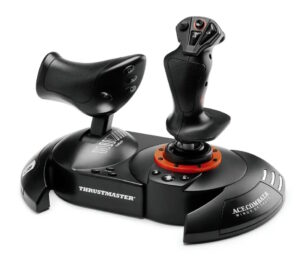
T.FLIGHT HOTAS NEO
Product number 4160854 4160947 4160951
Warning
USE ON PC – IMPORTANT INFORMATION!
If you are using the T.Flight HOTAS NEO on PC (Windows® 11), it is imperative that you first install the corresponding PC driver (should you fail to do so, some axes and/or buttons will not work properly).
# As of now, no firmware update is required. for the T.Flight Hotas NEO.
If you are using the T.Flight HOTAS NEO on PC (Windows® 11), it is imperative that you first install the corresponding PC driver (should you fail to do so, some axes and/or buttons will not work properly).
# As of now, no firmware update is required. for the T.Flight Hotas NEO.
Manual

Drivers
 Drivers - Package 2026_TFHT_3 + Firmware [System Requirement: Windows® 10 / 11]PC
 Release notes - Drivers - Package 2026_TFHT_3 + Firmware [System Requirement: Windows® 10 / 11]
Drivers - Package 2026_TFHT_3 + Firmware [System Requirement: Windows® 10 / 11]
This driver package is compatible with Joysticks:
- Airbus Add-On Grip- AVA Advanced Versatile Aviation- Hotas Warthog MKII- Simtask Farmstick (PC)- SimTask FarmStick (Xbox Series/PC)- SimTask FarmStick (PS5/PC)- SOL-R Flightstick- SOL-6 Throttle- T.16000M- T.16000M FCS- T.Flight Hotas 4- T.FLIGHT HOTAS 5 MSFS SPECIAL EDITION- T.Flight Hotas One *- T.Flight Hotas One - Microsoft Flight Simultor Edition*- T.FLIGHT HOTAS Neo (PS5/PC)- T.FLIGHT HOTAS Neo X (Xbox Series/PC)- TCA Sidestick Airbus Edition*- TCA Quadrant Airbus Edition- TCA Yoke Boeing Edition*- TCA Quadrant Boeing Edition- TCA Sidestick X Airbus Edition- TCA Sky Yoke (Xbox Series/PC)- TCA Sky Yoke (PS5/PC)- TWCS Throttle- Viper TQS- Viper Panel
* On PC, the USB sliding switch on the base must always be set to the PC position!
System Requirement:
- Windows® 11 & 10
**Changes made in new package version 2026_TFHT_3
- Add support for Hotas Warthog MKII- Add support for T.Flight Hotas NEO (Xbox Series/PC)- Add support for T.Flight Hotas NEO (PS5/PC)- Add support for TCA Sky Yoke (Xbox Series/PC)- Add support for TCA Sky Yoke (PS5/PC)
**Changes made in previous package version 2026_TFHT_2
- Add FW Boeing Yoke v1.56_BETA (Double command)
Changes made in previous package version 2026_TFHT_1
- Add support for T.FLIGHT HOTAS 5 MSFS SPECIAL EDITION- Add support for Airbus Add-On Grip
Changes made in previous package version 2025_TFHT_5
- Add support for SOL-R 6 Throttle- Added Firmware V1.34 for SOL-R Flightstick
Changes made in previous package version 2025_TFHT_4
- Add support for SimTask FarmStick (PS5/PC)- Added Firmware V1.14/ H V1.11 for SimTask FarmStick (PC)
Changes made in previous package version 2025_TFHT_3
- Add support for SOL-R Flightstick- Added Firmware V1.35/ H V2.03 for SimTask FarmStick (Xbox One/Xbox Series/PC)- Added Firmware v2.07 for AVA Advanced Versatile Aviation- Added dedicated control panel for AVA Advanced Versatile Aviation
Changes made in previous package version 2025_TFHT_2
- Added support for SimTask FarmStick (Xbox One/Xbox Series/PC)- Added Firmware V1.14/ H V1.10 for SimTask FarmStick (PC)
Changes made in previous package version 2025_TFHT_1
- Added support for T.Flight Hotas One - Microsoft Flight Simultor Edition
Changes made in previous package version 2024_TFHT_1
- Added support for AVA Advanced Versatile Aviation
Changes made in previous version 2023_TFHT_2:
- Added support for Simtask Farmstick- Added Firmware v1.26 for Viper TQS- TCA Quadrant Boeing: corrected a Control panel graphical glitch.
Changes made in previous version 2023_TFHT_1:
- Added support for Viper TQS- Added support for Viper Panel
Changes made in previous version 2022_TFHT_1:
- Added support for TCA Sidestick X Airbus Edition
Changes made in previous version 2021_TFHT_2:
- Added support for TCA Yoke Boeing Edition- Added support for TCA Quadrant Boeing Edition- Added Firmware V1.50 for Yoke Boeing Edition
Changes made in new previous version 2021_TFHT_1:
- Added Firmware V1.69 for TCA Quadrant Airbus Edition
Changes made in previous version 2020_TFHT_5:
- Added Firmware V1.61 for TCA Quadrant Airbus Edition
Changes made in previous version 2020_TFHT_5:
- Added Firmware V1.60 for TCA Quadrant Airbus Edition
Changes made in previous version 2020_TFHT_3:
- Improved CPL for TCA Sidestick Airbus Edition (Added Throttle mode selector)- Added Firmware V1.11 for TCA Sidestick Airbus Edition- Added Firmware V1.56 for TCA Quadrant Airbus Edition
Changes made in version 2020_TFHT_2:
- Improved CPL for TCA Sidestick Airbus Edition (ajout du selecteur de mode throttle)- Added Firmware V1.11 for TCA Sidestick Airbus Edition
Changes made in version 2020_TFHT_1:
- Added Support for TCA Sidestick Airbus Edition and TCA Quadrant Airbus Edition- Added Firmware V1.08 for TCA Sidestick Airbus Edition- Added Firmware V1.17 for TCA Quadrant Airbus Edition
Changes made in version 2019_TFHT_1:
- Added new firmware V1.17 for the T.Flight Hotas One joystick (V1.17 fixes an issue of axes freeze found on the joystick after Xbox One startup when the console was configured in Energy-saving / Full Shutdown mode).
Changes made in driver version 2018_TFHT_1:
- Added new firmware V25 for the T.Flight Hotas 4 Joystick (V25 brings a new Tip/Feature on PS4™ to program & combine the T.Flight Rudder Pedals with the T.Flight Hotas 4)
Your joystick’s Firmware version appears in the bottom right in the Control Panel’s tabs:
- T.Flight Hotas 4: V25- T.Flight Hotas 5: V1.09- T.Flight Hotas One: V1.17- T.Flight Hotas One - MSFS edition: V2.04- T.FLIGHT HOTAS Neo: v1_22_v108- T.FLIGHT HOTAS Neo X: v1_25_v108- TWCS Throttle: V8- TCA Sidestick Airbus Edition: V1.11- TCA Quadrant Airbus Edition: V1.69- TCA Yoke Boeing Edition: V1.50- TCA Quadrant Boeing Edition: V1.28- TCA Sidestick X Airbus Edition: V1.27- Viper TQS: V1.26/1.15- Viper Panel: V1.18- Simtask Farmstick (PC): V1.14/ H V1.11- SimTask FarmStick (Xbox One/Xbox Series/PC): V1.35/ H V2.03- SimTask FarmStick (PS5/PC): V1.24/ H V2.03- AVA Base: V1.14 / V2.07- SOL-R Flightstick: V1.34/ H V1.33- SOL-R Throttle: V1.04- Airbus Add-On Grip: V1.16
Important:
- DO NOT CONNECT the device to your PC before being prompted to do so.- DO NOT CLICK in any Windows-specific panes that may appear during the update process.- RESTART THE COMPUTER once the package setup is complete.
Create a folder for all your Thrustmaster downloads: right-click the Windows desktop, then point to New/Folder.
- Name the folder Thrustmaster Downloads.- Click the download link.- A File Download dialog box appears. Click Save.- A Save As dialog box appears. Select the Thrustmaster Downloads folder you have created and then click Save.
Installation:
**NOTE**: If a driver package for your product is already installed on the computer, running the package installation once will actually uninstall the previous version. It will then be necessary to run it again to proceed to the installation of the new version.
1- Double-click the installation file (2026_TFHT_3.exe) to proceed with the installation.
2- Follow the instructions displayed onscreen.
3- When done, select
- Start/All Apps/Thrustmaster/Control Panel.
The Game controllers dialog box is displayed.
The Throttle appears under the name TWCS Throttle, with the status OK.
The Joystick appears onscreen with the name T.FLIGHT HOTAS 4 and status indication OK
The Joystick appears onscreen with the name T.FLIGHT HOTAS One and status indication OK
4- In the Game Controllers dialog box, select Properties to test and view all functions.
a) TWCS throttle
Note: The Enable Center Deadzone tab allows you to activate or deactivate the mini-stick’s axes center dead zone. Your selection is automatically saved to the TWCS’s internal memory.
b) T.Flight Hotas 4
- “4/6 Axis Mode” (PS indicator light is Red) : On PC axes Rocker (Slider 0), Twist (RZ) & Rudder (Slider 1) are all combined on a single axis (RZ)- “5/8 Axis Mode” (PS indicator light is Green): On PC all axes are separated and independents.
c) T.Flight Hotas One/ T.Flight Hotas One - MSFS edition
- “4/6 Axis Mode” (Xbox buttons indicator light is On): On PC axes Rocker (Slider 0), Twist (RZ) & Rudder (Slider 1) are all combined on a single axis (RZ)- “5/8 Axis Mode” (Xbox buttons indicator light is Off): On PC all axes are separated and independents.
Click on OK to save your settings and exit the Control Panel.
d) TCA Quadrant Airbus Edition
“Enable Virtual Buttons” allows you to activate or deactivate the virtual buttons for the Throttle and Air Brake axes (with Add on installed).
Click on APPLY to save your settings and exit the Control Panel.
You are now ready to play!
Games settings
- T.Flight HOTAS NEO- PlayStation®4 Games list / Liste des jeux / Liste der spiele PS4™
- T.Flight HOTAS NEO- PlayStation®5 Games list / Liste des jeux / Liste der spiele PlayStation®5
-
 Mapping - Ace Combat 8 - PC & PS5 - T.Flight Hotas NEO - Native Mapping PC PlayStation®5
T.Flight HOTAS NEO- PlayStation®4 Games list / Liste des jeux / Liste der spiele
T.Flight Hotas NEO - PlayStation®4 Games list / Liste des jeux / Liste der spiele (PS4)
EN - The T.FLIGHT HOTAS NEO joystick is compatible with the following PS4™ games:
FR - Le joystick T.FLIGHT HOTAS NEO est compatible dans les jeux PS4™ suivants :
DE - Der T.FLIGHT HOTAS NEO Joystick ist mit den folgenden PS4™-Spielen kompatibel:
- Ace Combat 7™ : Skies Unknown – PS4™(**)- Air Missions: Hind – PS4™(**)- Air Conflicts: Secret Wars – PS4™(**)- Dogfighter - World War 2- Elite Dangerous – PS4™(**)- End Space - PS4™(**)- EVE: Valkyrie™ – PS4™(*)- EVE: Valkyrie™ Warzone – PS4™ (*)- Starblood Arena™ – PS4™(**)- STAR WARS™: Squadrons – PS4™ (*)- Ultrawings – PS4™(**)- THE CREW™ 2 – PS4™(*)- War Thunder – PS4™(*)
(*) In this game, the TFRP (T.Flight Rudder Pedals– sold separately) is natively compatible when
connected to the joystick’s connector.
(**) In this game, the rudder axis of the TFRP (T.Flight Rudder Pedals – sold separately) is
compatible when connected to the joystick’s connector and using this tip:
http://ts.thrustmaster.cn/download/accessories/manuals/tfh4/TFH4_TFRP_Combined_PS4.pdf
T.Flight HOTAS NEO- PlayStation®5 Games list / Liste des jeux / Liste der spiele
EN - Your joystick works with the following PS5™ games (#):
Note: On PlayStation®5, your joystick also works with all PS4™ compatible games listed in the
LIST OF PLAYSTATION®4 GAMES section.
FR - Votre joystick fonctionne avec les jeux PS5™ suivants (#):
Remarque : Sur PlayStation®5, votre joystick fonctionne également avec tous les jeux PS4™
compatibles. Liste disponible dans la catégorie LISTE DES JEUX PLAYSTATION®4.
DE - Ihr Joystick funktioniert mit den folgenden PS5™-Spielen (#):
Hinweis: Auf PlayStation®5 funktioniert Ihr Joystick auch mit allen PS4™-Spielen, die kompatibel
sind. Die Liste finden Sie in der Kategorie LISTE DER PLAYSTATION®4-SPIELE.
- Ace Combat 8™: Wings of Theve – PS5™ (**)- War Thunder – PS5™ (*) (**)- Aces of Thunder – PS5™ (*) (**)- Ultrawings 2 – PS5™ (*)- Awesome Asteroids – PS5™ (*)- Microsoft Flight Simulator – PS5™ (*)
(*) In this game, the TFRP (T.Flight Rudder Pedals– sold separately) is natively compatible when
connected to the joystick’s connector.
(**) Vibrations endorsed in the game
Many other games coming very soon
Nombreux autres titres à venir très prochainement
Viele andere Spiele folgen in Kürze
(#) PS5 games compatibility has been tested and endorsed by Thrustmaster. At stage of
publication, PS5 compatibility of the full range has not been yet tested nor endorsed by Sony
Interactive Entertainment LLC.
(#) Compatibilité avec les jeux PS5 testée et endossée par Thrustmaster. Au moment de la
publication, Sony Interactive Entertainment LLC n'a pas encore testé ni endossé la compatibilité
PS5 avec toute la gamme.
(#) Die Kompatibilität mit PS5-Spielen wurde von Thrustmaster getestet und bestätigt. Zum
Zeitpunkt der Veröffentlichung wurde die PS5-Kompatibilität des gesamten Sortiments noch
nicht von Sony Interactive Entertainment LLC getestet und bestätigt.
Mapping - Ace Combat 8 - PC & PS5 - T.Flight Hotas NEO - Native Mapping
PC PlayStation®5
Knowledge base


Licenses
PlayStation® Official Licensed Product